
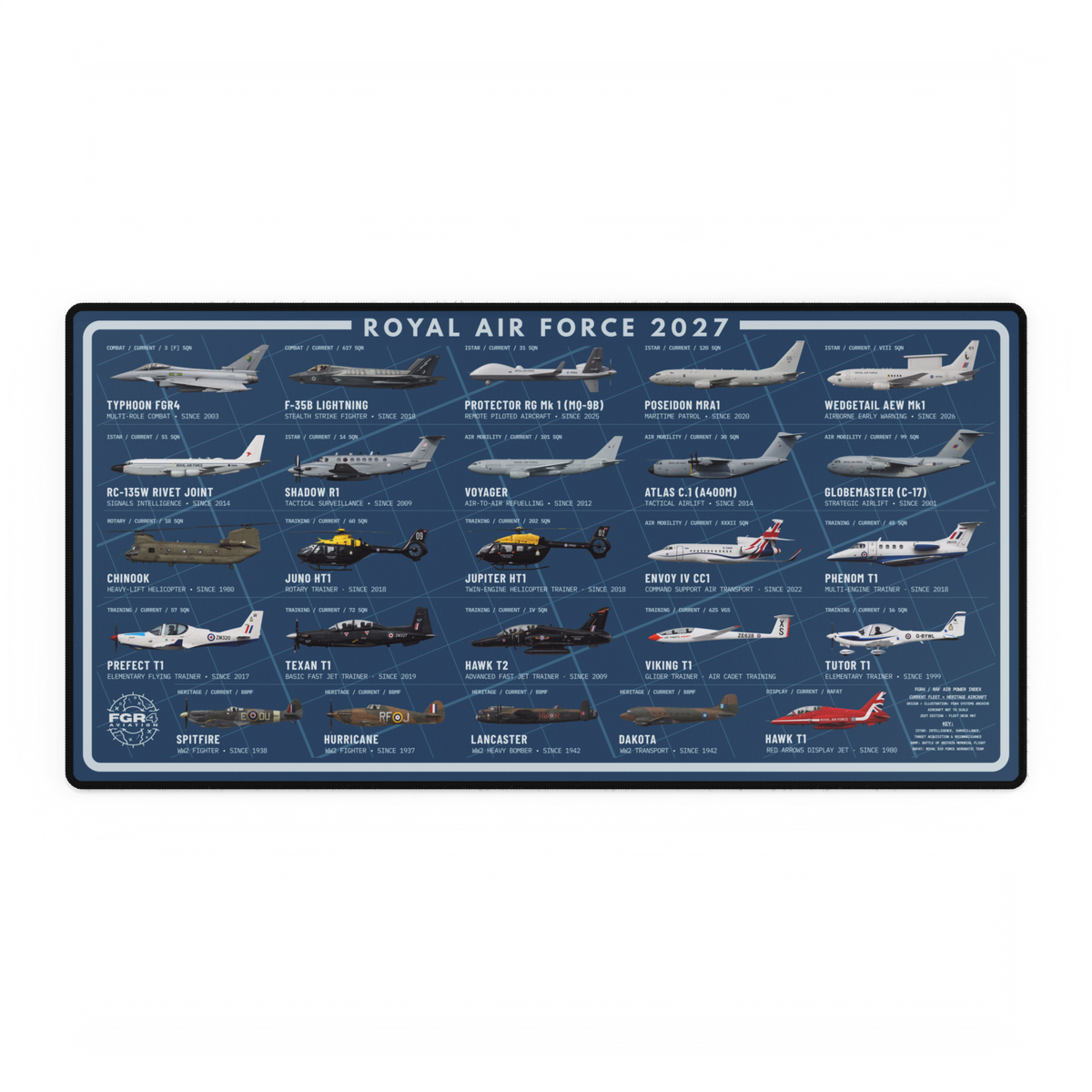
The four Royal Air Force 2027 Fleet Desk Mat editions use the same 25-aircraft line-up, size and technical layout. The choice is therefore about how the background colour works with your desk, lighting and other equipment.
Blueprint Blue, Heritage Sand, Night Ops Black and Squadron Green each change the mood of the design without changing its aircraft index. This guide gives you a simple way to choose one without trying to judge every colour in isolation.
Blue for a classic technical look. Sand for a lighter desk. Black for the strongest dark setup. Green for a muted squadron tone.
What stays the same across all four editions
Every edition carries the same 25-aircraft Royal Air Force 2027 line-up across combat, ISTAR, air mobility, rotary, training, heritage and display roles. Each uses the same 800 × 400 mm extended format, polyester top, natural-rubber backing and stitched edge. Colour does not change the aircraft coverage or desk-mat construction.
If you are deciding whether a multi-aircraft composition is right for you at all, read the guide to single-aircraft or fleet artwork first. Once the fleet format is settled, the four editions become a straightforward workspace decision.
Blueprint Blue: the clearest technical character
Blueprint Blue uses a cool mid-blue field with pale aircraft labels and line work. It feels closest to the visual language of technical plans while keeping more colour on the desk than the black edition.
Choose it when your setup already uses blue lighting, silver hardware or cool grey accessories, or when you want the background to be visibly coloured without becoming the brightest object on the desk.
Heritage Sand: the lightest edition
Heritage Sand is the lightest of the four. Its warm cream-toned field creates the strongest contrast with a black keyboard, mouse or monitor stand and gives the aircraft line-up a paper-chart character.
It suits lighter rooms, wood desks and setups where another black surface would feel heavy. Because it is visually brighter, it will also be the most noticeable edition in a dark workstation.
Night Ops Black: the strongest dark-desk match
Night Ops Black places the line-up on the darkest field. The pale type and aircraft profiles stay prominent while the mat itself sits naturally beside black peripherals and dark monitor arms.
Choose it when you want the desk mat to feel integrated with a dark setup. It is also the closest desk-mat companion to the live RAF 2027 Fleet Poster, which uses the Night Ops Black edition.
Squadron Green: a restrained military tone
Squadron Green uses a muted green field rather than a bright display colour. It keeps the technical layout readable while giving the workspace a warmer, more field-led character than Blueprint Blue or Night Ops Black.
It works well with olive, tan, wood and dark-grey accessories. Choose it when you want a military aviation reference in the colour itself without moving to the light Heritage Sand edition.
Use the three-object test
You do not need a full interior-design plan. Look at the three largest objects immediately around the mat: the desk surface, keyboard and monitor or laptop. Then choose the edition that either matches two of those objects or creates one deliberate contrast.
- For a blended setup: match the mat to the keyboard and monitor hardware.
- For one clear focal surface: contrast the mat with the desk.
- For mixed accessories: choose the most neutral link between them—usually Blueprint Blue, Night Ops Black or Squadron Green.
Also check the room in normal daytime and evening light. A colour that looks balanced beside a window can read differently under warm desk lighting. The product selector on the RAF 2027 Fleet Desk Mat page lets you compare all four editions before choosing.
Choose for the artwork you will actually read
The line-up is detailed, so leave enough clear desk area to see it. If a large keyboard, flight controls or a laptop will cover the centre permanently, focus your colour choice on the visible outer field rather than expecting every label to remain on show.
For the aircraft context behind a fleet line-up, the RAF fleet-list reading guide explains how type, role, operator and date should be separated. Artwork provides an illustrated overview; it does not replace an official equipment table.
The short answer
Pick Blueprint Blue for a classic technical look, Heritage Sand for a lighter and warmer desk, Night Ops Black for a dark integrated setup, or Squadron Green for a muted military tone. The aircraft index and physical format stay the same, so the best edition is the one that fits the objects and lighting already around it.
Browse the complete FGR4 Fleet Series if you are comparing the desk mat with the wall-art format.
Product source
Prepared from the live FGR4 product record checked 30 October 2026. All four colour editions were available for sale at the time of checking.