
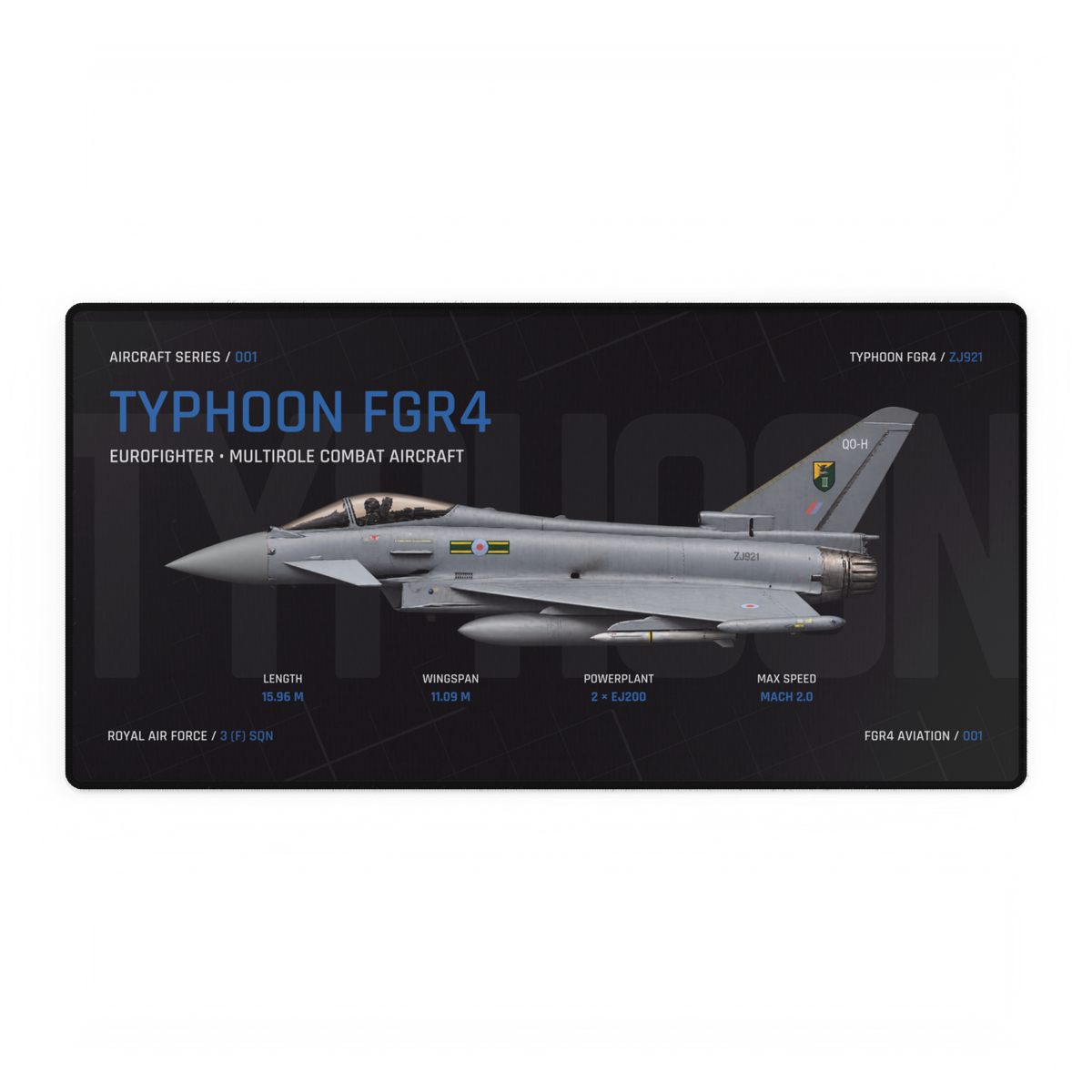
A keyboard placed across the middle of the Typhoon design will hide part of the aircraft. Before choosing a desk mat, look at the artwork with your everyday equipment in mind: which details will you still see while you work?
The Typhoon FGR4 Aircraft Desk Mat gives us a specific example. Its current product page lists an 800 × 400 mm format. Below, we use that footprint and an explicitly assumed keyboard size to show why position matters as much as the amount of space an object occupies.
Read the artwork before covering it
In the pictured Dark Edition artwork, the Typhoon points left, with its nose and cockpit on the left-hand side and its tail rising towards the upper right. The aircraft stretches across the central part of the design. The large Typhoon title sits above it, while smaller technical labels run beneath.
That gives you several details to consider. A keyboard over the centre can cover the fuselage; moving it lower may reveal more of the aircraft while obscuring the labels underneath. A mouse, notebook or monitor foot can cover another part of the composition. The useful question is which details matter most to you, rather than whether the entire design stays visible.
Two positions on the same surface
Schematic, not a product photograph. Both diagrams use an 800 × 400 mm mat and an assumed 440 × 140 mm keyboard. The blue dashed band is a simplified central artwork zone. It is not a traced aircraft outline, and these examples are not tested desk layouts.
A — Keyboard crosses the central artwork zone
B — Keyboard sits nearer the front edge
In both examples, the keyboard starts 100 mm from the left edge. In A its rear edge is 125 mm from the top of the mat; in B it is 210 mm from the top. B therefore leaves a 50 mm strip between the keyboard and the front edge. These positions illustrate visibility tradeoffs, not recommended typing positions.
The footprint stays the same; the view changes
The illustrative keyboard covers 61,600 square millimetres. The listed mat footprint is 320,000 square millimetres, so the keyboard occupies about 19% of that nominal rectangle. That figure describes surface area, not the percentage of the aircraft hidden. It also excludes a mouse, wrist rest and every other item on the desk.
Moving the keyboard does not change that 19%. It changes what sits underneath it. In the first diagram, the keyboard crosses the central band. In the second, it leaves more of that band open above it, at the cost of covering a lower part of the surface. Actual artwork coverage depends on the design, your keyboard and its position.
Try the idea with your own equipment
Start with your normal keyboard position. Keep a comfortable, usable working layout; do not move equipment into an awkward position simply to reveal more artwork.
- Measure your keyboard's width and depth, including any wrist rest you intend to use.
- Measure the clear surface available around the monitor stand and other permanent objects.
- Mark out the proposed mat footprint with paper, then place your equipment in its usual positions.
- Compare those positions with the product image. Decide whether the aircraft, title or smaller details will remain visible where you want them.
For the wider fitting exercise, use our desk mat sizing guide. If flight controls share the same surface, our work and flight-sim desk guide covers planning a repeatable changeover.
Choose the view you will use every day
A clear product photograph shows the whole composition. Your working desk will show a different version, framed by the equipment on top. Judge that everyday view before ordering.
Compare the pictured layout with the current Typhoon FGR4 Aircraft Desk Mat, checking the available edition and dimensions on the product page. If another aircraft is your subject, explore the Aircraft Series and repeat the same visibility check with its artwork.