
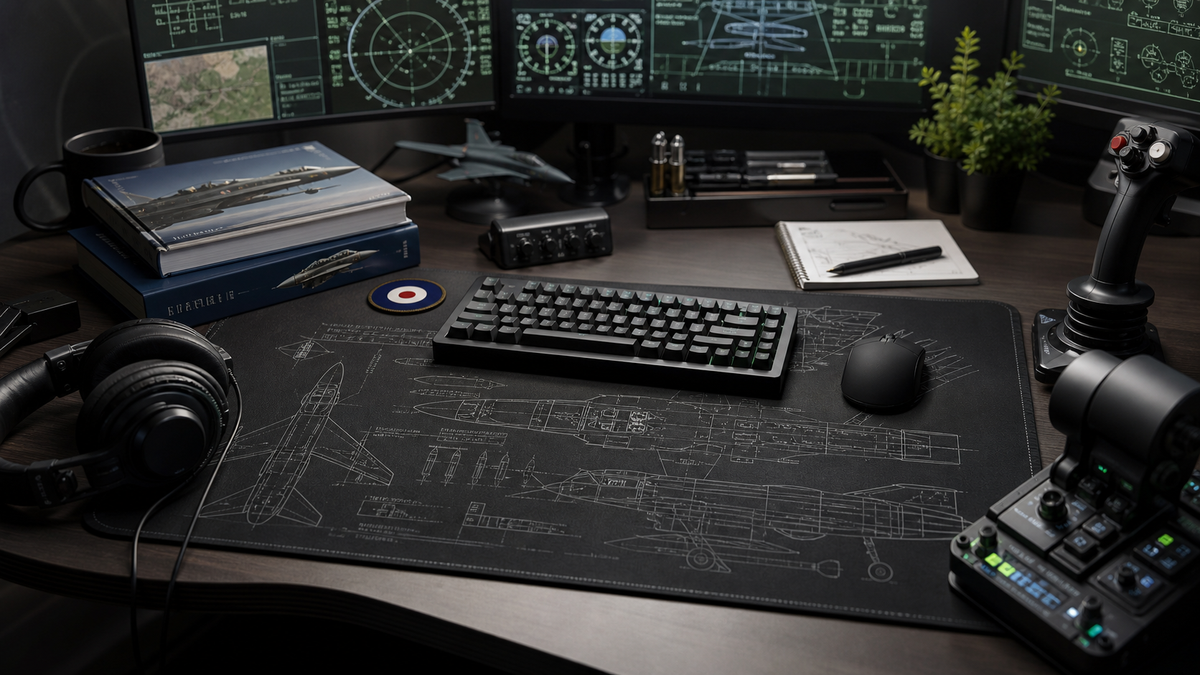

A good military aviation desk setup should feel purposeful before it feels decorative.
That is the difference between a desk that simply has a few aviation items on it and a desk that feels properly aviation-led. The best setups still work as real spaces: a workstation, a gaming desk, a flight simulation corner, a study area, or the place where someone plans their next model build, reads aircraft books, edits photos, or watches airshow footage.
Military aviation gives you a strong visual language to work with. Sharp silhouettes, muted colours, technical details, squadron-style accents, aircraft surfaces, tactical greys, greens, blacks, whites, and metallic tones can all work beautifully on a desk. The trick is choosing a direction first, then letting the setup support that direction without overcrowding the space.
Choose the direction before buying more aviation gear
The easiest way to make a desk look messy is to add every aviation thing you like at once.
A Tornado model, a Typhoon print, a squadron patch, a Spitfire mug, a random poster, a headset stand, a joystick, a throttle, two desk mats, and three aircraft books might all be good items individually. Together, they can make the setup feel less intentional.
Before adding anything, decide what the setup is trying to say.
There are four useful routes:
- one aircraft;
- one service or air arm;
- one era;
- broader military aviation.
One aircraft is the cleanest route. A Typhoon setup feels modern, sharp, and current. A Tornado setup feels more rugged, low-level, and RAF strike-aircraft led. One aircraft gives the desk a clear identity and makes every supporting decision easier.
One service works well if you want the desk to feel RAF-led without committing to a single aircraft. The Royal Air Force collection is the natural FGR4 route for that kind of setup, because it keeps the theme broad while still staying coherent.
One era can work if you are drawn to a particular period of aviation: Cold War fast jets, modern RAF operations, classic military aviation, or current multirole aircraft. This helps with colour, print choice, and the type of details you add.
Broader military aviation is the most flexible route, but it needs the most restraint. If the setup covers several aircraft, keep the colour palette and layout controlled so the desk still feels designed rather than random.
Start with the main desk surface
The desk surface is usually the best place to start because it carries the theme without adding more objects.
That matters. Most people do not need a desk that looks like a museum shelf. They need a desk that works. The keyboard still needs space. The mouse still needs room. A notebook, headset, controller, joystick, throttle, tablet, or coffee mug still has to fit somewhere sensible.
A full aviation desk mat gives the strongest visual base. It sits under the working area and makes the aviation theme feel built into the setup, rather than placed on top of it. For larger desks, flight simulation corners, editing stations, and gaming desks, a desk mat can frame the whole space.
An aviation mouse pad is better when the desk is smaller, shared, or already busy. It gives the setup an aircraft-led point of focus without taking over the whole surface.
The format should match the desk, not just the aircraft. A full mat can look excellent on a larger workstation, but cramped on a tiny desk. A mouse pad can be the better choice if the setup already has sim hardware, audio gear, or limited free space.
Keep the colour palette controlled
Military aviation themes work best when the colours feel disciplined.
Black, charcoal, grey, white, dark green, muted blue, silver, and metal tones are all strong starting points. They work with aircraft artwork, technical drawings, RAF themes, flight simulation gear, and modern desk hardware without becoming too loud.
The aim is not to make everything the same colour. A desk with only black items can feel flat. A desk with too many accent colours can feel chaotic. A good military aviation setup usually has:
- one dominant base colour;
- one or two supporting neutral tones;
- one restrained accent colour;
- one clear aircraft or aviation surface tying it together.
For example, a black desk, grey monitor arm, white keyboard legends, dark mouse, muted green lighting, and a RAF-themed desk mat can feel intentional without needing much else. The aviation identity comes from the surface and supporting details, not from covering every inch of the desk.
Add aviation details carefully
Once the surface and colour direction are set, add the smaller aviation details.
This is where restraint matters most. One good supporting item is often better than five average ones.
Useful additions include:
- one aircraft print;
- one small model;
- one patch or squadron-style detail;
- one aviation book;
- one headset stand;
- one framed photo;
- one technical drawing or aircraft-side profile;
- one small light or display item.
Avoid filling the whole desk with aviation objects. If everything is trying to be the focal point, nothing is.
A military aviation setup should still leave breathing room. Negative space makes the aircraft-led parts look stronger. A clean surface, tidy cables, and one or two good aviation cues usually feel more premium than a desk overloaded with unrelated items.
For a more RAF-specific setup route, the FGR4 guide to RAF aircraft desk setup ideas is a useful next step. This article is broader; that one goes deeper into the RAF-led version of the same idea.
Make the setup work for flight simulation
Flight simulation desks have a different problem: the gear is already functional and often bulky.
A joystick, throttle, rudder pedals, button box, keyboard, mouse, headset, monitor, and tablet can take over the space quickly. That makes the setup direction even more important.
For a sim corner, the aviation theme should support the flying area rather than compete with it. The controls need to be reachable. The mouse needs room. The keyboard should not be buried. Cables should be managed enough that the setup does not feel temporary.
A desk mat can help because it visually connects the hardware. It turns separate pieces of gear into one clearer working zone. A mouse pad can work better if the controls take most of the desk and there is only a smaller area left for normal mouse use.
If you are buying for someone else, be careful with flight simulation hardware. Compatibility, mounting, desk space, and personal preference all matter. That is why the FGR4 guide to aviation gifts for flight simulator fans focuses on safer upgrade routes as well as sim-adjacent ideas.
Aircraft-specific setups feel sharper
If the person has a favourite aircraft, lean into it.
Aircraft-specific setups usually feel stronger than generic aviation setups because the decision is clear. A Typhoon-led desk says something different from a Tornado-led desk. A wider RAF setup says something different again.
The Eurofighter Typhoon collection suits a modern RAF fast jet setup: sharper, cleaner, more current, and technical. It works well with black hardware, neutral surfaces, controlled lighting, and a desk that already has a modern gaming or flight simulation feel.
The Tornado GR4 route has a different mood. It feels more connected to retired RAF strike aircraft, low-level flying memories, and a particular era of fast jet aviation. If that is the aircraft that matters, the FGR4 article on why the Tornado GR4 remains a favourite with RAF aviation fans is the stronger supporting read.
The point is not that one aircraft is better. It is that the aircraft sets the tone. Once you know the tone, the desk becomes easier to build.
Where FGR4 fits into the setup
FGR4 works best in this kind of setup when the product is part of the desk's structure, not an afterthought.
An aircraft-themed surface can do a lot of work visually. It gives the desk an aviation identity while keeping the space useful. It is easier to live with than adding more and more objects, and it can suit a home office, gaming desk, sim corner, or general enthusiast setup.
Start with the format:
- use a desk mat if the setup has room for a larger visual surface;
- use a mouse pad if the desk is smaller or already full;
- use a broader RAF route if the person likes several aircraft;
- use an aircraft-specific route if one aircraft is clearly the favourite.
The aviation desk mats collection is the best starting point for a larger military aviation desk setup. The aviation mouse pads collection is the better route for smaller surfaces. If the setup should feel RAF-led rather than aircraft-specific, browse the Royal Air Force collection.
Final approach
A military aviation themed desk setup should feel specific, useful, and controlled.
Choose the direction first. Start with the surface. Keep the palette tight. Add one or two aviation details carefully. Make sure the desk still works for daily use, gaming, flight simulation, or study.
The best setup is not the one with the most aviation items. It is the one where every item feels like it belongs.
For a larger desk or sim corner, start with FGR4's aviation desk mats. For smaller setups, look at the aviation mouse pads. For a broader RAF theme, use the Royal Air Force collection as the main route.