
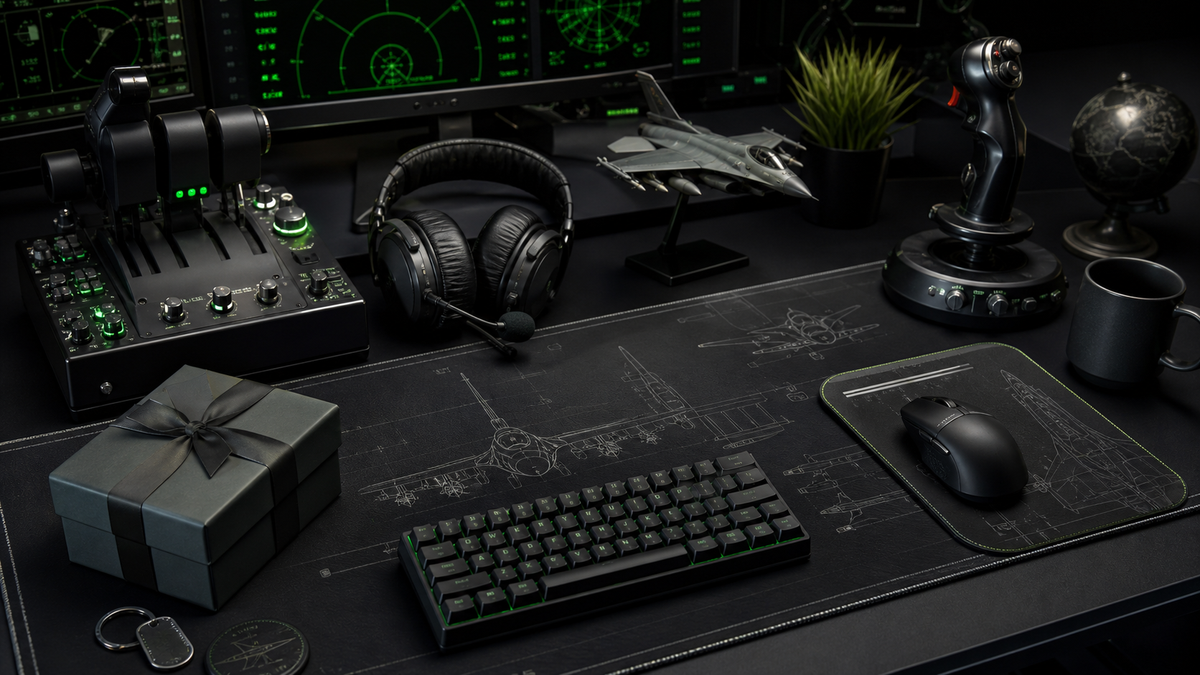
Buying a gift for a flight simulator fan can be surprisingly difficult. The obvious route is to look for simulator hardware, but that is also where things get risky fast. Yokes, throttles, pedals, panels, head trackers, and control mounts all depend on the exact simulator, desk space, platform, aircraft preference, and setup they already use.
That is why the best aviation gifts for flight simulator fans are often the ones that improve the world around the simulator rather than trying to replace the simulator itself. A good gift makes their desk feel more aircraft-led, more organised, more personal, or more enjoyable to sit at, without needing to know whether they fly Microsoft Flight Simulator, DCS, X-Plane, civil airliners, RAF fast jets, helicopters, or a bit of everything.
Start with gifts that are setup-safe
The safest flight sim gifts usually have one thing in common: they do not need technical compatibility. A flight simulator desk can use better surfaces, better lighting, better organisation, and stronger aviation identity regardless of the exact hardware on it.
That makes an aviation desk mat one of the strongest gift routes. It changes the feel of the whole desk without needing drivers, mounts, USB ports, software settings, or platform knowledge. It also sits exactly where a sim pilot spends their time: under the keyboard, mouse, notebook, controls, and everyday setup gear.
For smaller desks, laptop setups, or shared workspaces, an aviation mouse pad is a lower-commitment version of the same idea. It still gives the setup an aircraft theme, but it is easier to fit into almost any space.
Avoid hardware unless you know the setup
Simulator hardware can be an excellent gift if you know exactly what the person needs. The problem is that most gift buyers do not. A yoke is brilliant for some civil aviation sim pilots and completely wrong for someone who mostly flies fast jets. Rudder pedals are useful, but they need floor space. A throttle quadrant might duplicate something they already own. A stick mount might not fit their desk.
If you are not sure, avoid buying major hardware blind. Instead, choose gifts that support the setup around the hardware they already have. Desk mats, mouse pads, wall art, cable organisation, headset stands, notebooks, lighting, aircraft models, and aircraft-themed desk accessories are usually safer because they add to the environment rather than interfering with it.
This is especially true for people who use one desk for work, gaming, and flight simulation. A practical aviation gift should improve that shared desk rather than make it harder to use.
Choose around their aircraft taste
Flight simulator fans are rarely just interested in "planes" in a generic way. Most have a leaning. Some love RAF fast jets. Some prefer airliners. Some are drawn to Cold War aircraft. Others are into helicopters, naval aviation, general aviation, or modern combat simulation.
If you know they like RAF and military aviation, the Royal Air Force collection is the most direct place to start. It gives the gift a clear aviation identity without needing to know their exact simulator hardware.
If they are into modern fast jets, a Typhoon-led gift can feel sharper and more current. The Eurofighter Typhoon collection works well for people who like modern RAF aircraft, clean desk setups, and a more technical fast-jet feel.
For fans of classic RAF strike aircraft, the RAF Tornado GR4 desk mat gives the setup a focused aircraft theme. Tornado has a strong enthusiast following and enough character to work as the centrepiece of a sim desk or aviation workstation.
Think in desk zones
A good flight sim setup is not just hardware. It is a working desk with zones. The centre is usually keyboard, mouse, monitor, and daily-use space. The sides might hold a joystick, throttle, headset, stream deck, kneeboard, notebook, or model aircraft. The wall or shelf behind the desk can carry posters, patches, prints, and aircraft references.
That is why setup gifts work so well. They help the sim pilot make the desk feel intentional. A desk mat can define the main surface. A mouse pad can create a smaller aircraft zone. A headset stand keeps flying gear accessible. A small model or print can add character without getting in the way of controls.
The goal is not to cover the desk in aviation items. The goal is to make the desk feel like it belongs to someone who genuinely cares about aircraft.
For more layout inspiration, the FGR4 guide to RAF aircraft desk setup ideas goes deeper into building an aviation-led workspace without making it cluttered.
Gift ideas by confidence level
Safest pick
Choose an aviation mouse pad or desk mat. It is useful, visual, and easy to add to an existing setup. This is the best route if you know they like aircraft but do not know their exact hardware.
Best setup upgrade
Choose a larger desk mat if their desk has space. It gives the whole workstation a stronger aviation identity and works especially well for sim pilots who use a keyboard, mouse, joystick, or throttle around the same surface.
Best RAF-focused pick
Choose something from the Royal Air Force range. This works well if they follow RAF aircraft, airshows, military aviation pages, DCS fast jets, or modern combat aviation.
Best aircraft-specific pick
Choose a Tornado, Typhoon, or other aircraft-led design if you know their favourite aircraft. Specificity makes the gift feel more considered.
Best supporting gift
Choose a headset stand, cable organiser, small model, aviation print, notebook, or lighting upgrade. These are useful when the person already has a strong sim setup but needs the surrounding desk to feel cleaner.
What to avoid
Avoid buying expensive simulator hardware unless you are certain it fits their setup and flying style. Avoid generic aviation gifts that feel disconnected from the desk or simulator. Avoid anything too large if you do not know their room layout. And avoid novelty items if the person has a more serious sim or military aviation setup.
The best gifts feel useful first, aviation-themed second. That is what makes them last.
Final approach
If you are buying for a flight simulator fan and you are not sure where to start, choose something that upgrades the space they already use. A desk mat, mouse pad, aircraft print, or focused RAF design is far easier to get right than blind simulator hardware.
For FGR4, that is where aviation desk mats and mouse pads make sense as gifts. They are practical, aircraft-led, easy to add to a setup, and specific enough to feel personal. Start with the aviation desk mat collection, choose a smaller aviation mouse pad, or browse the Royal Air Force collection if the recipient is especially into RAF and military aviation.