
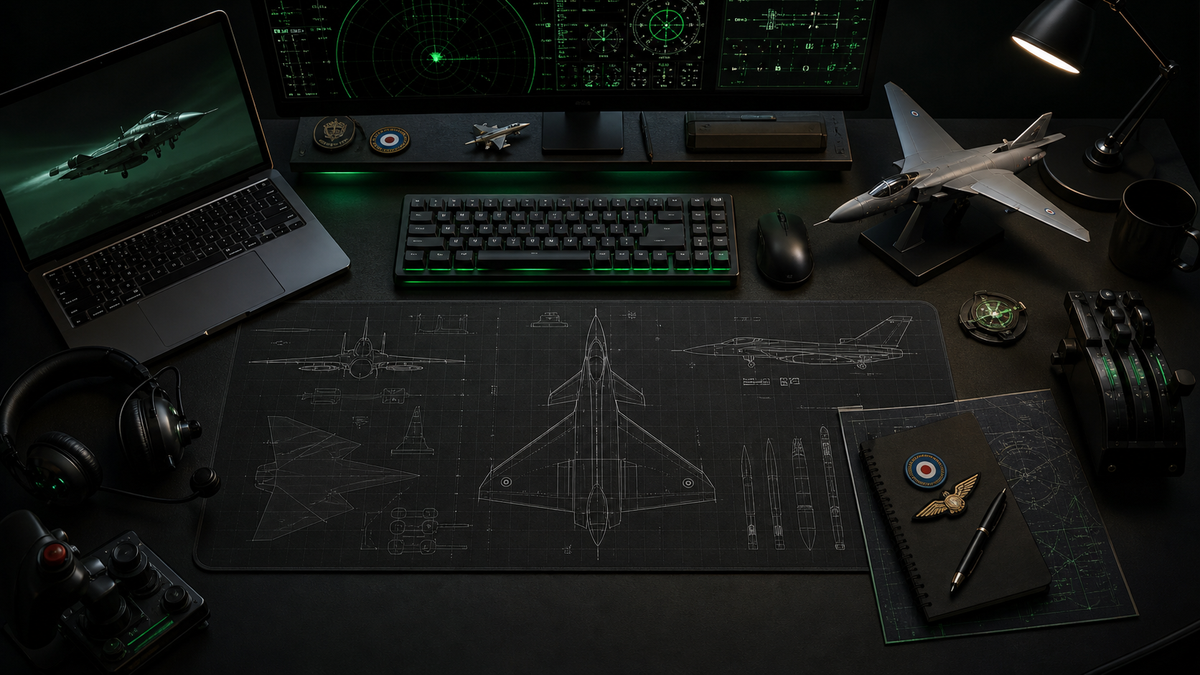
An RAF aircraft desk setup works best when it feels like a small operating position, not a random collection of aircraft items. The strongest setups have a clear visual lead, a practical working surface, enough restraint to stay usable, and one or two details that make the whole thing feel personal to the enthusiast using it.
That is the difference between a desk with aviation decoration and a desk that actually feels aviation-led. For FGR4 customers, the sweet spot usually sits somewhere between RAF briefing room, flight sim station, collector display, and clean daily workstation. The setup should still do its job. It just happens to do it with Tornado, Typhoon, RAF, and military aviation character built into the surface.
Start with the aircraft surface, not the accessories
The desk surface is the easiest place to set the direction because it is always visible and always in use. A poster can disappear behind a monitor. A model can feel like decoration. A desk mat sits directly under the keyboard, mouse, notebook, controls, and everyday kit, so it becomes the visual base of the whole workspace.
For most RAF enthusiasts, that makes an aviation desk mat the natural starting point. It gives the setup a clear aircraft signal without needing to fill the room with extra objects. It also makes the theme feel deliberate because the aviation element is built into something practical.
If the desk is smaller, shared, or already visually busy, an aviation mouse pad can do the same job in a tighter footprint. That route works especially well for laptop desks, gaming setups, office corners, or gift buyers who want something useful without committing to a full desk transformation.
Choose one RAF direction before adding more pieces
The fastest way to make an aviation setup look messy is to mix every aircraft, era, and colour scheme at once. A stronger approach is to pick one direction first, then let the rest of the setup support it.
That direction might be modern RAF fast jets, Cold War strike aircraft, flight simulation, squadron identity, RAF heritage, or a single favourite aircraft. A broad Royal Air Force collection works when the goal is RAF identity across the whole desk. A single aircraft product works when the setup is meant to feel more focused.
For example, a Tornado fan does not need ten different aircraft references to make the point. A RAF Tornado GR4 desk mat, one clean wall print, and a restrained desktop can say more than a cluttered mix of unrelated aircraft. The Tornado already carries enough character: low-level strike aircraft energy, RAF heritage, variable-sweep silhouette, and a strong enthusiast following.
The same logic applies to Typhoon-led setups. A Typhoon surface gives the desk a more current RAF fast-jet feel: sharper, cleaner, more modern, and easier to pair with black peripherals, neutral lighting, and a tidy monitor layout.
Build the desk like a briefing position
The best aviation desks usually have zones. Not formal zones with labels and rules, but a simple sense of what belongs where.
The centre should stay functional: keyboard, mouse, notebook, and whatever you touch every day. The left or right side can hold a model, small display item, flight sim controls, stream deck, throttle quadrant, or headset stand. The wall or shelf behind the desk can carry the wider aircraft identity through a print, framed artwork, squadron patch, or small collection.
This is where restraint matters. One hero aircraft surface and two or three supporting details will usually look better than five competing themes. A strong RAF desk setup might use:
- an aircraft desk mat as the visual base;
- one framed print or poster above the monitor;
- a model aircraft or small display item;
- tidy lighting and cable routing;
- flight sim controls that can be used without fighting the rest of the workspace.
That combination gives the desk character without turning it into storage.
Make flight sim gear part of the layout
Many aviation enthusiasts use the same desk for work, gaming, browsing, and flight simulation. The problem is that flight sim gear can quickly take over the whole surface if it is not planned properly.
If the setup includes a joystick, throttle, yoke, pedals, panels, or head-tracking kit, treat those as operational equipment rather than decoration. They need space, reach, and a quick way to move in or out of position. A desk mat works well here because it visually ties the normal workstation and the sim station together. When the controls are off to the side, the desk still looks aviation-led. When the controls move into position, the whole setup feels coherent.
For a cleaner sim corner, avoid placing display items exactly where controls need to move. Keep the aircraft artwork under the practical area and use the wall or shelf for the collector pieces. That keeps the desk ready to use, which matters more than adding one more object.
Use colour and lighting to support the aircraft
RAF and military aviation products often work best with restrained surroundings. Black, grey, dark green, steel, white, and muted blue tones let the aircraft artwork carry the interest. Heavy RGB lighting, too many bright accessories, or mismatched posters can make even a strong aircraft design feel less premium.
That does not mean the setup has to be plain. It means the supporting choices should help the aircraft read clearly. A Tornado setup can lean more heritage and strike-aircraft focused. A Typhoon setup can feel sharper and more modern. A wider RAF collection setup can use a cleaner museum-display mood, especially if the products are technical or fleet-led.
Lighting should help the desk surface and monitor area, not overpower them. A small desk lamp, monitor light bar, or controlled LED strip can work well if it makes the setup feel deliberate.
Four setup routes that actually work
The clean RAF workstation
Use one RAF desk mat or mouse pad, a tidy monitor layout, restrained peripherals, and one wall print. This is the best route for someone who wants an aviation desk that still feels grown-up and usable every day.
The flight sim corner
Build around screen position, controls, and reach. Use the aircraft surface as the visual base, then keep decorative items away from the controls. This setup should feel ready to fly, not just ready to photograph.
The aircraft-specific setup
Choose one aircraft, such as Tornado GR4 or Typhoon FGR4, and let everything support that aircraft. This is usually stronger than mixing too many types. The result feels more like a focused enthusiast station.
The gift-ready aviation desk
For gift buyers, a desk mat or mouse pad is one of the safest aviation presents because it is useful, visual, and does not require knowing clothing sizes, simulator hardware preferences, or shelf space. It gives the recipient a centrepiece they can build around later.
Final approach
The best RAF aircraft desk setup starts with one clear decision: what aircraft story should the desk tell? Once that is decided, the rest becomes easier. Pick the surface, keep the working area usable, add supporting details carefully, and let the aircraft identity breathe.
For FGR4, that is where the product range fits naturally. The desk mat or mouse pad is not just an accessory. It is the base layer of the whole setup: practical enough for daily use, specific enough for real aviation enthusiasts, and strong enough to make an ordinary desk feel like it belongs to someone who genuinely cares about aircraft.
From there, start with the FGR4 aviation desk mat collection, browse the wider Royal Air Force range, or choose a focused aircraft piece like the RAF Tornado GR4 desk mat if the setup needs a stronger aircraft-led identity.