
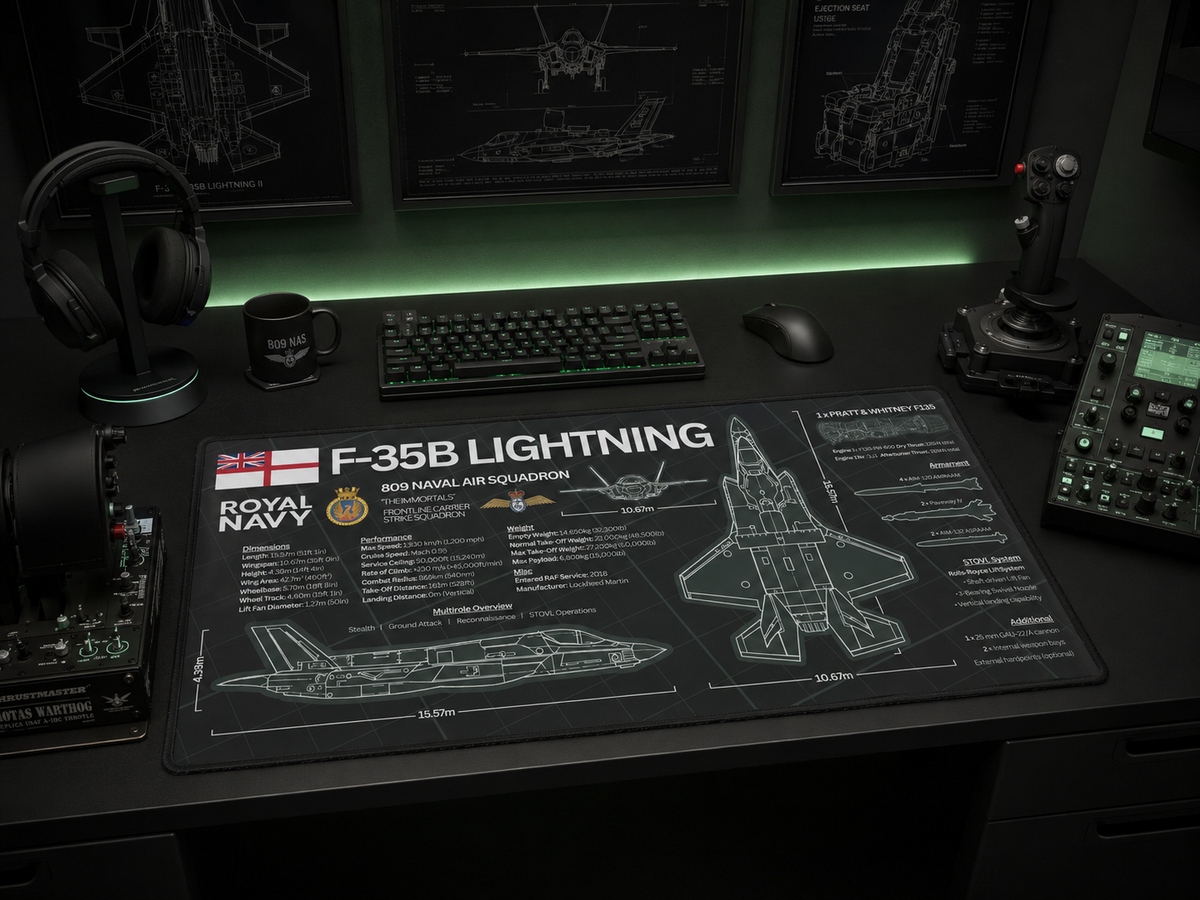
A good flight sim setup is not just about the joystick, throttle, yoke, pedals or monitor. The desk itself matters too.
Your desk surface affects comfort, control placement, mouse movement, cable organisation and the overall feel of the setup. Whether you fly fast jets, airliners, helicopters or military aircraft in your simulator, the right desk mat can make the whole space feel cleaner, more immersive and more personal.
So, what makes the best desk mat for a flight sim setup?
The answer is simple: it needs to be large enough, smooth enough, stable enough and visually connected to the aircraft world you love.
Choose a desk mat large enough for your controls
Flight sim setups usually take up more room than a normal desk layout.
You might have a keyboard, mouse, joystick, throttle, yoke, stream deck, headset, notepad, tablet or extra button panels all fighting for space. A small mouse mat can quickly make the desk feel messy and disconnected.
A larger desk mat helps pull everything together. It gives your keyboard and mouse a proper base, creates a clear working zone and helps stop the setup from feeling like a collection of loose accessories.
For most flight sim users, a wide desk mat is the better choice because it gives more room for mouse movement, keyboard placement and smaller accessories without making the desk look cluttered.
Look for a smooth tracking surface
A flight sim desk mat should still work properly as a practical desk accessory.
Even if most of your flying is done with a joystick, throttle or yoke, you will still use your mouse for menus, camera controls, maps, checklists, aircraft selection, browser tabs and general desktop use.
A smooth desk mat surface makes that easier. It gives the mouse a consistent feel, helps with accuracy and makes the whole setup more comfortable during longer sessions.
This is especially useful for people who use their desk for both flight simulation and everyday work.
Make sure the mat stays in place
Nothing ruins a setup faster than a mat that slides around.
A good flight sim desk mat should feel stable on the desk, especially when you are moving your mouse, repositioning your keyboard or adjusting smaller controls. It should act as the foundation of the workspace rather than another loose object on the surface.
This is where size and grip both matter. A larger mat naturally has more contact with the desk, which helps it stay planted. A proper non-slip base also helps keep the layout feeling controlled and tidy.
Pick a design that adds immersion
This is where an aviation desk mat becomes more interesting than a plain gaming mat.
Flight sim setups are built around immersion. The monitor, controls, aircraft choice and lighting all help create the feeling of being connected to aviation. A desk mat can do the same.
Aircraft silhouettes, blueprint layouts, squadron-inspired details, cockpit-style graphics, RAF references, Royal Navy aviation themes and technical markings can all make the setup feel more authentic.
Instead of using a plain black mat or a generic gaming design, an aviation-themed desk mat gives the workspace a clearer identity.
For RAF fans, military aircraft enthusiasts and sim pilots, that detail matters.
Match the mat to the aircraft you love
The best flight sim setups usually have a theme.
Some people build their setup around airliners. Others prefer general aviation, helicopters, Cold War aircraft, modern fighter jets or military operations. If you are into RAF aircraft, your desk setup might naturally lean towards the Typhoon FGR4, F-35B Lightning II, Tornado GR4, A400M Atlas or the wider RAF fleet.
Choosing a desk mat that matches your aviation interest makes the setup feel much more personal.
A Typhoon FGR4 mat suits a fast jet-focused setup. An F-35B Lightning II mat works well for modern stealth and carrier aviation fans. A full RAF fleet mat is a strong option if you want the whole modern Royal Air Force represented on the desk.
The more connected the design feels to your aircraft interest, the better the setup will look.
Use the desk mat to organise the workspace
A good desk mat does more than protect the desk.
It visually organises the space.
The mat creates a defined zone for your keyboard, mouse and core accessories. This helps stop the desk from looking scattered, especially if you have flight sim controls placed around it.
You can use the mat as the main visual anchor, then build the rest of the setup around it. Add a joystick to one side, a throttle on the other, a headset stand nearby and a monitor or flight display above.
This creates a cleaner and more intentional setup.
Avoid making the setup too cluttered
Flight sim desks can easily become crowded.
Controls, cables, panels, mounts, tablets, headsets and notebooks all take up space. If you add too many decorative items on top of that, the desk can start to feel messy.
A detailed aviation desk mat is useful because it adds personality without adding more physical clutter. The aircraft detail is built into the surface itself, so the setup can feel more complete while still staying clean and usable.
That is why a desk mat is one of the easiest upgrades for a flight sim workspace.
Why an aviation desk mat works better than a normal gaming mat
A normal gaming mat can work fine, but it usually does not say much about the person using it.
For aviation enthusiasts, a specialist aircraft desk mat feels more relevant. It connects the setup to the aircraft, squadrons, technical details and operational style that make aviation interesting in the first place.
It also makes the desk feel less generic.
A flight sim setup should feel like it belongs to someone who actually cares about aircraft. A proper aviation desk mat helps do that without needing to overcomplicate the room.
Best features to look for
When choosing a desk mat for a flight sim setup, look for:
-
a wide surface area
-
smooth mouse tracking
-
a stable non-slip base
-
stitched or clean edges
-
aircraft-inspired design
-
enough room for keyboard and mouse
-
a design that matches your aircraft interest
-
a premium look that works beyond gaming
The best option is not just the most colourful or the biggest. It is the one that makes your setup feel more complete.
Final thoughts
The best desk mat for a flight sim setup should be practical, comfortable and visually connected to aviation.
It should help organise the desk, support your keyboard and mouse, stay stable during use and add something to the overall atmosphere of the setup.
For flight sim users, RAF fans and military aircraft enthusiasts, an aviation-themed desk mat is one of the simplest ways to make a workspace feel more personal and immersive.
Explore FGR4 aviation desk mats designed for flight sim users, RAF fans and military aircraft enthusiasts.