
Choose AIRFRAMES / 2027 if you want a different aircraft subject each month; choose Night Ops if the appeal is aviation after dark. Both FGR4 desk calendars cover 2027, use a landscape 10 × 5 in format and were listed at £23.99 when checked on 12 November 2026. The useful choice is the artwork you want beside you every day.
A calendar is a small piece of desk space with a year-long job. Before choosing a cover, look at an open month, decide where it will stand and check whether you want a date reference or room for detailed notes. Here is how these two designs compare.
The differences at a glance
| What matters | AIRFRAMES / 2027 | Night Ops 2027 |
|---|---|---|
| Artwork direction | Twelve aircraft-themed months | Aviation-inspired night-time artwork |
| Listed format | Landscape, 10 × 5 in / 25.4 × 12.7 cm | Freestanding landscape, 10 × 5 in / approximately 25.4 × 12.7 cm |
| Calendar pages | Monthly date grids for 2027 | Dated grids for every month of 2027 |
| Listed finish | 250 gsm satin-finish paper | Satin finish; paper weight is not stated in the listing |
| Construction details | Black metal spiral binding and black tent-style backing | Freestanding format; check the product gallery for its construction |
| Price at this check | £23.99 | £23.99 |
The matching format and price remove two common deciding factors. They do not establish that every construction detail is identical: use each product's own specification, especially if paper weight matters to you.
Choose the artwork you want to live with
AIRFRAMES: start with the aircraft
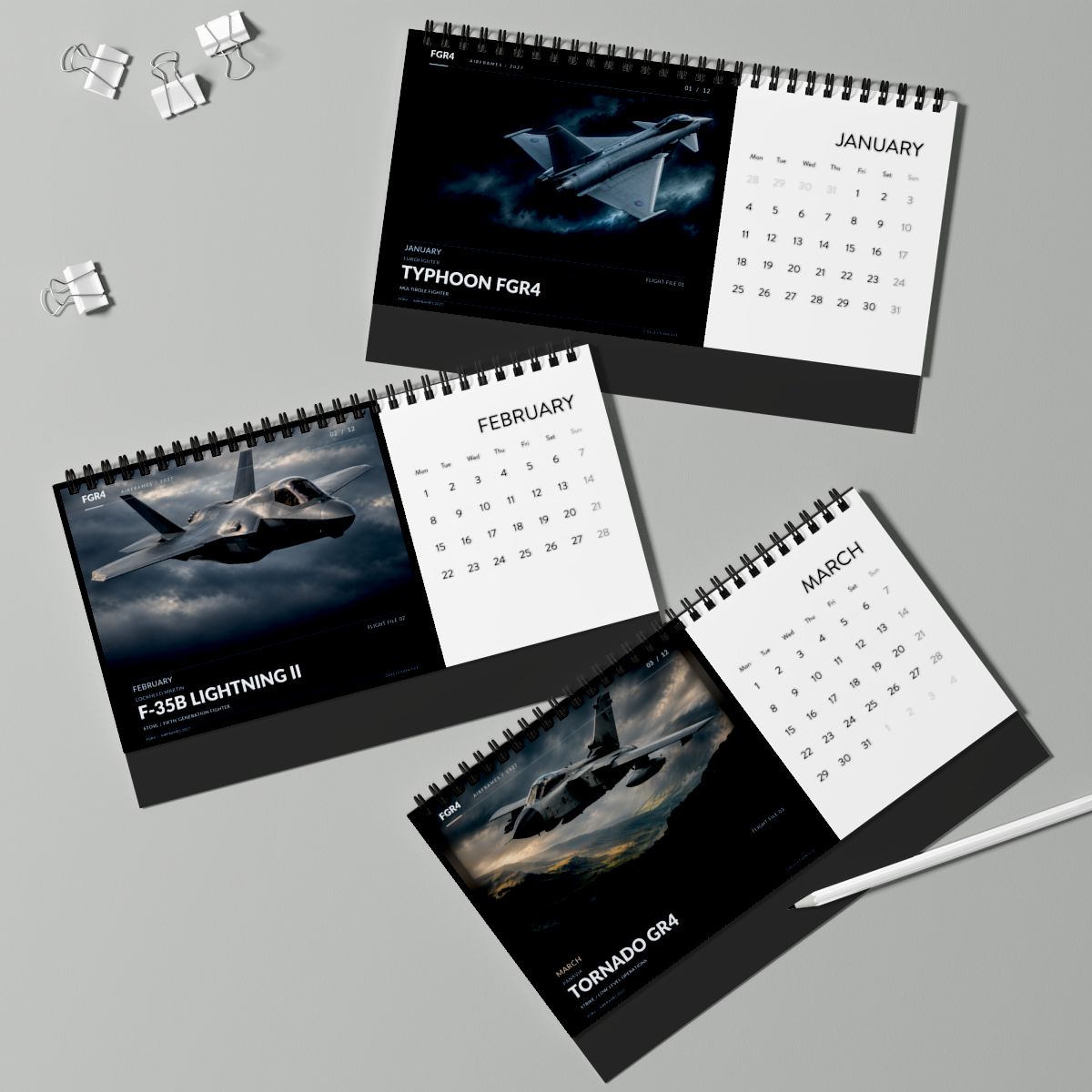
The AIRFRAMES gallery shows January's Typhoon FGR4, February's F-35B Lightning II and March's Tornado GR4 alongside their monthly grids. The named subjects make it a natural starting point for someone who enjoys recognising the aircraft as much as the scene around it.

The open-month image above is more useful than the cover for this decision: it shows how the aircraft panel and date grid share the page. It is a supplier product mockup of the artwork, rather than a photograph of a documented flying event.
Night Ops: start with the atmosphere
Night Ops takes an after-dark approach. Its cover uses a dark aircraft against clouds and a moonlit sky; the listing describes aviation-inspired night-time artwork throughout the calendar. If that is the look you want beside a monitor or on a shelf, inspect its monthly gallery before choosing.
Do not infer a particular aircraft variant or a real operation from a dramatic illustration. This comparison is about the products' artwork and format. Our guide to technical and dynamic aircraft art can help if you are still deciding what kind of image you enjoy.


Check the desk before you choose
- Find a clear sightline. Sit in your normal working position and identify a spot where the keyboard, monitor base or flight controls will not hide the dates. A calendar behind the screen is easy to forget.
- Mark out the listed width. Use a ruler or a 25.4 cm strip of paper to check the horizontal space. The listed 10 × 5 in format is not a measurement of the depth of an opened tent stand; allow space behind it and check the side-view image.
- Preview a month, not only the cover. The date grid is what you will use. If you need to record several appointments per day, check the available writing space carefully rather than assuming a compact desk calendar replaces a planner.
- Leave access to turn the page. Avoid wedging the calendar under a low monitor shelf or directly against other equipment.
For a workstation that also carries flight controls, the shared work and flight-sim desk guide offers a useful way to think about what stays on the desk and what moves between sessions.
Buying it as a gift?
Use the recipient's existing favourites as the clue. Someone who names aircraft on sight may enjoy browsing AIRFRAMES' monthly subjects. Someone who chooses dramatic aviation scenes for their screen or wall may prefer Night Ops. Those are starting points for choosing, not claims that one design suits every pilot or enthusiast.
Both listings are for 2027. If you are ordering for a particular date, check the current production and delivery information before paying. The products are made to order; this guide does not promise Christmas arrival. For other formats and budgets, continue to the 2026 aviation Christmas gift guide.
Make the choice
Start with the month you would most like to see on your desk, then check the space and delivery details. AIRFRAMES offers the aircraft-themed route; Night Ops offers the after-dark route.
Explore the 2027 aviation desk calendars
Product specifications, prices and availability checked against the FGR4 catalogue and public product pages on 12 November 2026. Images are owned catalogue/supplier mockups. This is a comparison of the listed products and their visible artwork, not a hands-on print or durability test. Current product pages govern options, price and delivery.